Learn how to build an automated AI news website using Gemini and Cursor. This step-by-step guide explains RSS scraping, AI summarization, and WordPress automation without coding.
AI-powered automation is redefining how websites are built and scaled. Instead of manually writing and publishing content, you can now create systems that automatically collect, process, and publish information using large language models.
In this guide, you will learn how to build a fully automated AI news website using Gemini and Cursor. More importantly, you will understand how each part of the system works—from data ingestion to content generation and publishing—so you can scale it effectively.—
What You Can Build with AI Automation
At a high level, an AI news automation website is a pipeline that transforms raw information into published content.
This pipeline typically includes:
- Data ingestion (RSS feeds or APIs)
- Content transformation (AI summarization)
- Publishing layer (WordPress automation)
- Scheduling and orchestration
With tools like Gemini and Cursor, this entire workflow can be implemented with minimal manual coding.
This approach is often referred to as Vibe Coding—a workflow where developers define intent through prompts, and AI systems generate and refine the implementation.—
Core SEO Keywords Covered
This guide naturally targets high-intent search queries such as:
- AI coding tools
- Cursor AI coding
- Gemini AI automation
- WordPress automation scripts
- Vibe Coding tutorial
- AI content automation
These keywords reflect users looking for actionable, system-level solutions rather than generic AI explanations.—
Step 1: Designing the Automation Workflow with Gemini
Before generating any code, it is important to define the system architecture. This is where Gemini plays a critical role.
Instead of jumping directly into implementation, you can use Gemini to map out the workflow:
I want to build an automated WordPress site that posts AI summaries of financial news daily. What architecture, APIs, and steps are required?
From this prompt, Gemini can outline:
- Data sources (RSS feeds, news APIs)
- Processing steps (summarization, filtering)
- Publishing mechanism (WordPress REST API)
- Scheduling strategy (cron jobs or task runners)
This step is not just planning—it defines the system boundaries and prevents structural issues later.—
Step 2: Generating the Automation Script with Cursor
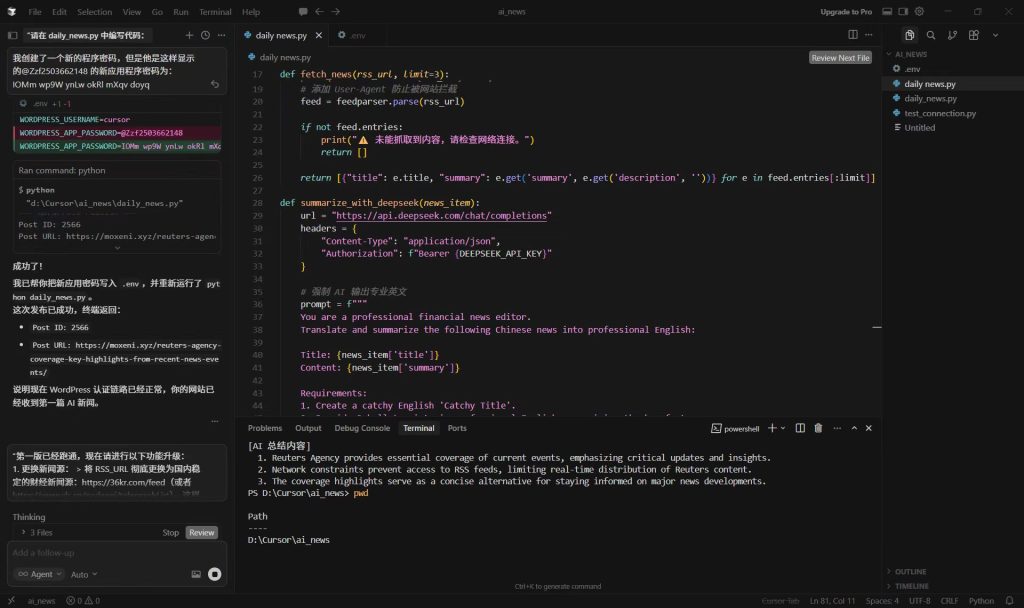
Once the workflow is defined, Cursor acts as the execution layer by generating the actual code.
A typical prompt might look like:
Create a Python script that fetches news from an RSS feed, summarizes each article using an AI API, and publishes the result to WordPress using the REST API. Use a .env file for credentials.
Under the hood, this script usually consists of several components:
- RSS parsing (e.g., feedparser)
- HTTP requests for content fetching
- LLM API calls for summarization
- Authentication with WordPress REST API
Cursor not only generates the code but also helps structure the project, making it easier to run and iterate.
While this process feels “no-code,” it is more accurately described as AI-assisted coding, where abstraction replaces manual implementation.—
Step 3: Automating WordPress Publishing
The WordPress REST API serves as the bridge between your automation script and your website.
Through API requests, your system can:
- Create new posts
- Assign titles and content
- Set categories and tags
- Schedule publication times
Technically, this involves sending authenticated POST requests to endpoints such as:
/wp-json/wp/v2/posts
Once configured, your site effectively becomes a content endpoint, receiving and publishing data automatically.—
Step 4: Debugging and Iteration with AI
One of the most significant shifts in modern development is how debugging is handled.
Instead of manually tracing errors, you can feed logs directly into Cursor:
The script failed. Analyze the error and fix it.
This works because LLMs can interpret stack traces, identify missing dependencies, and suggest fixes in context.
The result is a faster iteration cycle, especially for beginners who may not yet have